
A GST refund is an important feature under the Goods and Services Tax system that allows taxpayers to claim back extra tax they have paid or unused Input Tax Credit (ITC). Refunds may arise for several reasons, such as exports, an inverted duty structure, or excess money deposited in the electronic cash ledger. Different types of GST refund claims require different application forms depending on the situation.
Because of this, it is important for businesses and taxpayers to clearly understand how the GST refund process works. This article explains the step-by-step process for applying for different types of GST refunds in simple terms.
Who Is Eligible for a GST Refund?
Under the Goods and Services Tax system, certain taxpayers can claim a refund when they have paid more tax than required or have unused input tax credit. The following individuals or businesses are generally eligible to apply for a GST refund:
- Exporters of goods or services who have paid GST and want to claim the refund.
- Suppliers making zero-rated supplies (such as exports) without paying tax under a bond or LUT.
- Businesses facing an inverted duty structure, where the tax on inputs is higher than the tax on the final product.
- Taxpayers who accidentally paid excess GST due to calculation or filing errors.
- Recipients who paid advance tax for supplies that were not eventually provided.
- Taxpayers with extra balance in the electronic cash ledger on the GST portal.
These situations allow taxpayers to claim a refund and recover the excess tax paid under GST.
Documents Required for GST Refund
To claim a refund under the Goods and Services Tax system, taxpayers must submit certain documents to support their refund application. These documents help verify the refund claim and ensure that the process is completed smoothly.
- GST Refund Application – Form RFD-01
The main application form used to request a GST refund on the GST portal. - Tax Invoices Related to the Refund Claim
Copies of invoices related to the goods or services for which the refund is being claimed. - Proof of Tax Payment (Challans)
Documents showing that GST has been paid, such as tax payment challans. - Export Documents
If the refund relates to exports, documents such as shipping bills, export invoices, or a Letter of Undertaking (LUT) may be required. - Bank Account Details
Correct bank account information must be provided so the approved refund amount can be credited directly. - Additional Documents (If Required)
Depending on the type of refund, the tax authorities may ask for extra documents to verify the claim.
Time Limit for Claiming a GST Refund
Time Limit for Claiming a GST Refund
Under the Goods and Services Tax rules, taxpayers must apply for a GST refund within 2 years from the relevant date. The “relevant date” depends on the type of refund claim, such as exports, excess tax payment, or an inverted duty structure.
How to Submit a GST Refund Pre-Application Form
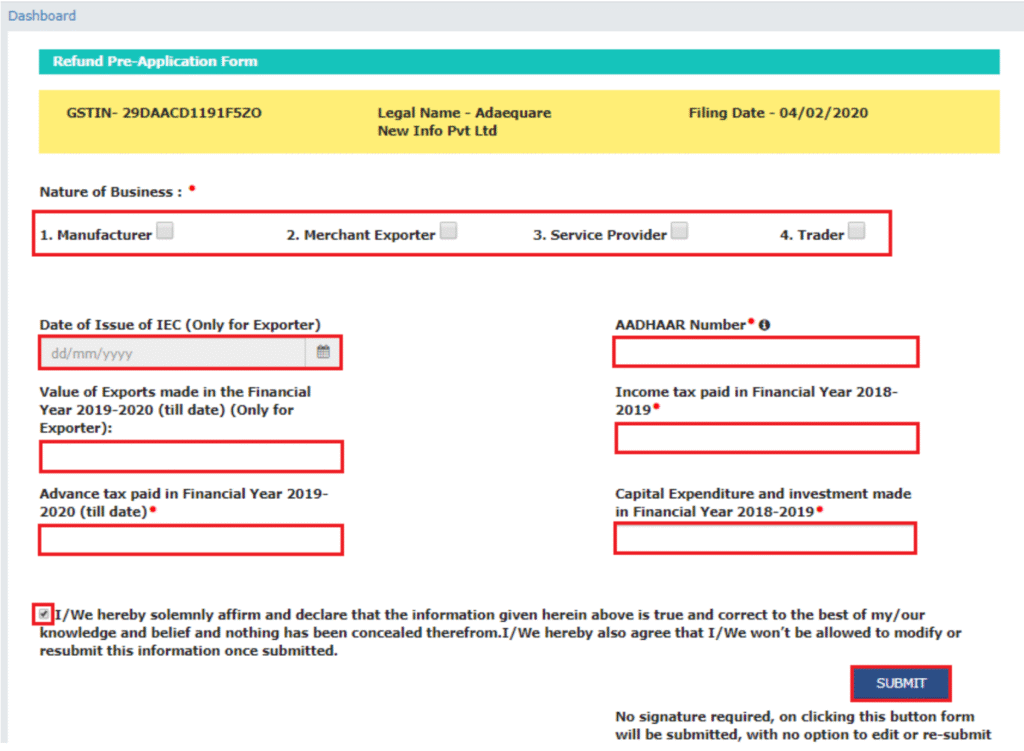
A GST refund pre-application form is required to provide basic information about the taxpayer and the business before filing the refund claim. In this form, taxpayers may need to enter details such as their business information, Aadhaar number, income tax details, export information, and investment or expenditure details.
This form must be completed for most GST refund claims. It does not require a digital signature, and once it is submitted, the details cannot be edited. Therefore, taxpayers should carefully check all information before submitting the form.
Steps to File the GST Refund Pre-Application Form
Step 1: Log in to the GST Portal
Visit the GST portal and log in using your credentials. Then go to the “Services” tab, select “Refunds”, and click on the “Refund Pre-Application Form” option to begin the process.

Step 2: Fill in the Refund Pre-Application Form
After selecting the Refund Pre-Application Form on the GST Portal, a page will appear where the taxpayer must enter the required details. Once all the information is filled in correctly, click on “Submit.” After submission, a confirmation message will appear on the screen.
The following information must be provided in the form:
- Nature of Business – Select the type of business such as manufacturer, merchant exporter, trader, or service provider.
- Date of Issue of IEC (Import Export Code) – Exporters applying for a refund related to exports without payment of tax must provide the date when their Import Export Code was issued.
- Aadhaar Number of the Primary Authorised Signatory – Providing the Aadhaar number of the authorised signatory is mandatory.
- Value of Exports in FY 2019–2020 – Exporters must report the total value of exports for that financial year. The value should be calculated at the GSTIN level, not the PAN level.
- Income Tax Paid in FY 2018–2019 – The amount of income tax paid during the financial year 2018–2019 must be mentioned.
- Advance Tax Paid in FY 2019–2020 – Details of any advance tax payments made during the financial year 2019–2020 should be included.
- Capital Expenditure and Investment in FY 2018–2019 – Information about investments and capital expenditure made during that financial year must also be reported.
Refund Process of IGST Paid on Export of Goods (With Tax Payment)
Under the Goods and Services Tax system, exports are treated as zero-rated supplies. This means exporters can claim a refund of the Integrated GST (IGST) and any cess paid on exported goods. To make the process easier for exporters with large numbers of transactions, the GST system provides an automated refund mechanism. In this case, a separate refund application in Form RFD-01 is generally not required, but certain conditions must be fulfilled.
First, the exporter must report export details in Table 6A of Form GSTR-1, including shipping bill details for exports made with payment of tax, and file the return within the due date. The summary of these export transactions must also be reported in Table 3.1(b) of Form GSTR-3B. In addition, the applicable tax must be paid and the return must be filed within the time limit prescribed under GST law.
While entering export invoice details in Table 6A of GSTR-1, exporters must provide the correct shipping bill number, shipping bill date, and port code. Export transactions for a particular tax period should be reported in both GSTR-1 and GSTR-3B for the same period. Also, the total IGST and cess reported in Table 3.1 of GSTR-3B should be equal to or higher than the amounts reported in the export tables of GSTR-1.
In this process, the shipping bill itself is treated as the refund application. The GST portal sends export data from GSTR-1 to the Indian Customs Electronic Gateway (ICEGATE), along with confirmation that GSTR-3B has been filed. The customs system then matches the data with the shipping bill and the Export General Manifest (EGM). Once the details are verified, the refund is processed.
After the refund amount is credited to the taxpayer’s bank account, ICEGATE shares the payment information with the GST portal. The portal then notifies the taxpayer about the refund through SMS and email.
Steps to Apply in Form RFD-01 for GST Refund
Under the Goods and Services Tax system, Form RFD-01 is used to claim different types of GST refunds through the GST Portal.
It can be used in cases such as:
- Excess balance in the electronic cash ledger or excess tax payment
- IGST paid on export of services
- Accumulated Input Tax Credit (ITC) from exports without tax payment
- Supplies made to SEZ units or SEZ developers
- Refund due to inverted duty structure
- Deemed export refunds
- Refund due to assessment, appeal, or other official orders
- Refund claimed on any other valid ground or by unregistered taxpayers
Taxpayers must ensure that invoice details in GSTR-1 match the details provided in RFD-01. In some cases, a certificate from a Chartered Accountant or Cost Accountant may also be required.
Step 1:
Log in to the GST portal, go to Services → Refunds, and select Application for Refund to start the process.

Step 2:
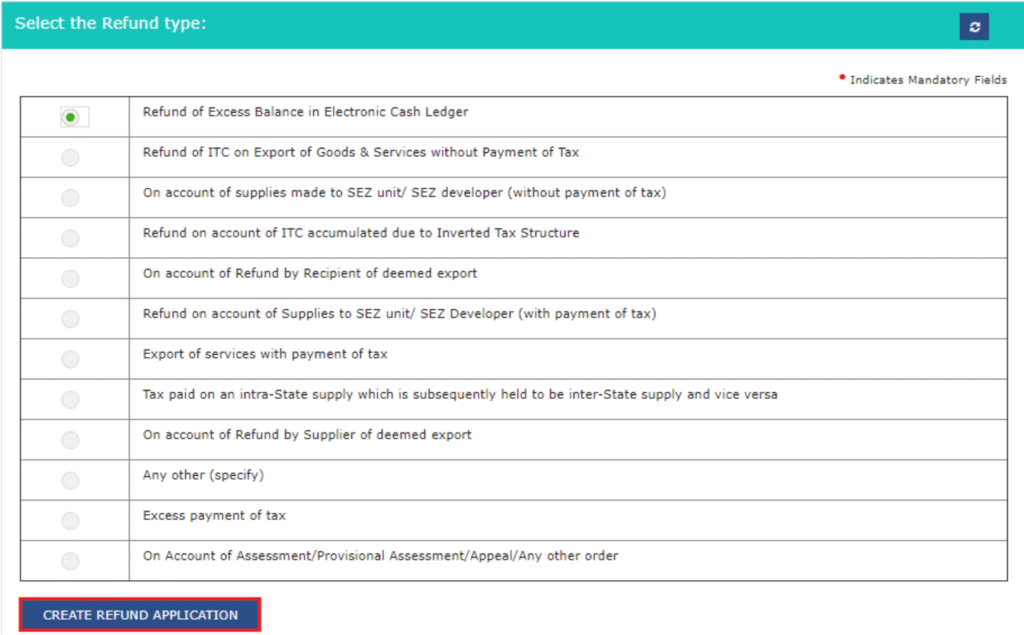
On the next page, select the reason or type of refund you want to claim. After choosing the correct option, click on “Create Refund Application” to continue with the refund process on the GST Portal.
Step 3:
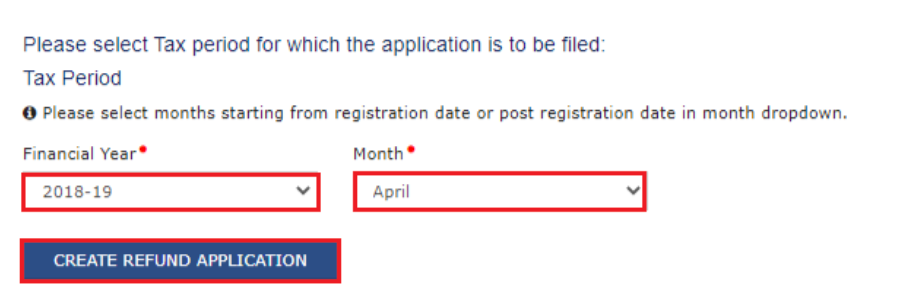
Select the tax period for which you want to claim the refund. Then choose “Yes” or “No” in the dialog box asking whether you want to file a Nil refund. After selecting the appropriate option, continue with the refund application on the GST Portal.
If you are filing a Nil refund, the taxpayer can tick the declaration box and submit the application using DSC (Digital Signature Certificate) or EVC (Electronic Verification Code) on the GST Portal.
However, this step does not apply to certain refund types, such as:
- Excess balance in the electronic cash ledger
- Intrastate supply later treated as interstate supply (and vice versa)
- Refund due to assessment, provisional assessment, appeal, or other official orders
Step 4:
On the next page, enter the required details based on the type of refund selected in the previous step and proceed with the application.
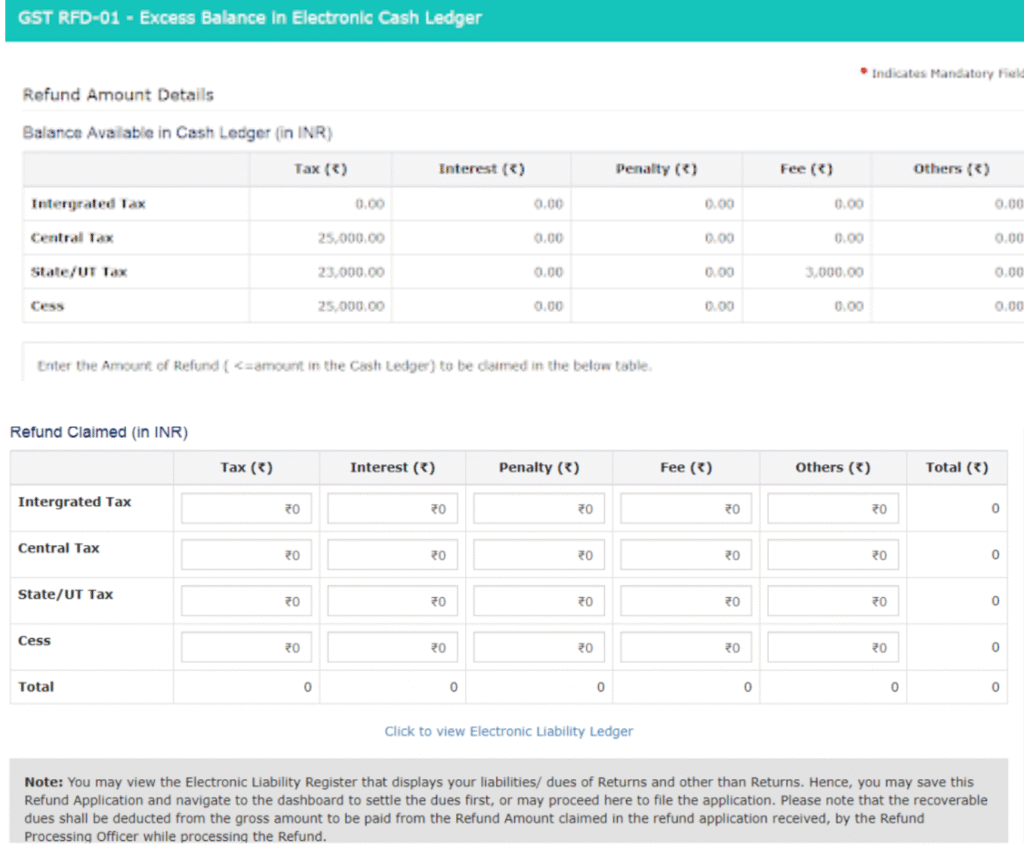
Type 1: Excess Cash Balance in Electronic Cash Ledger
If you have extra money in your electronic cash ledger under the Goods and Services Tax system, you can claim it as a refund.
In this step, simply enter the amount you want to claim as a refund from the available cash balance and proceed with the application on the GST Portal.
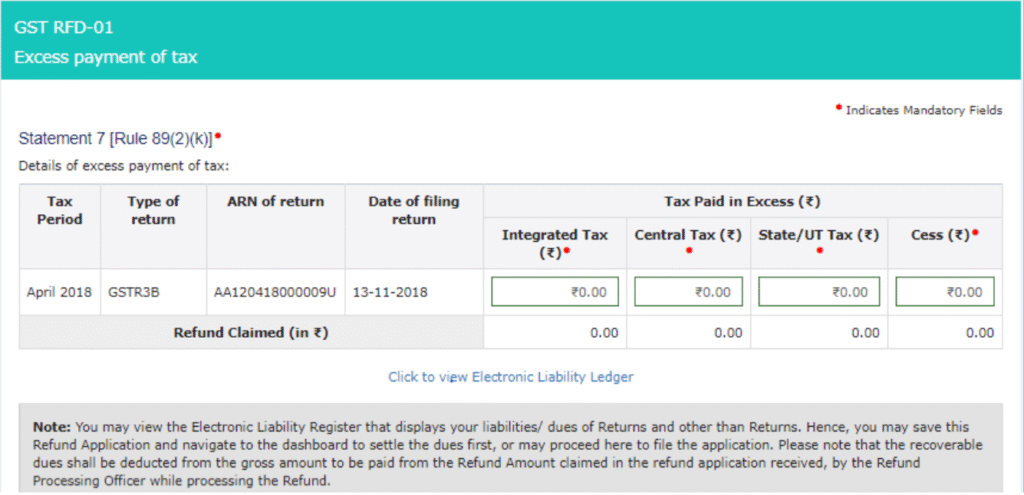
Type 2: Excess Tax Paid through GSTR-3B
If you have paid more tax than required while filing GSTR-3B under the Goods and Services Tax system, you can claim the extra amount as a refund.
In this step, you need to enter the details of the GSTR-3B return in which the excess tax payment was made in cash and proceed with the refund application on the GST Portal.
Type 3: Accumulated ITC Due to Exports Without Payment of Tax
If you export goods or services without paying tax, you can claim a refund of the accumulated Input Tax Credit (ITC) under the Goods and Services Tax system.
Step a:
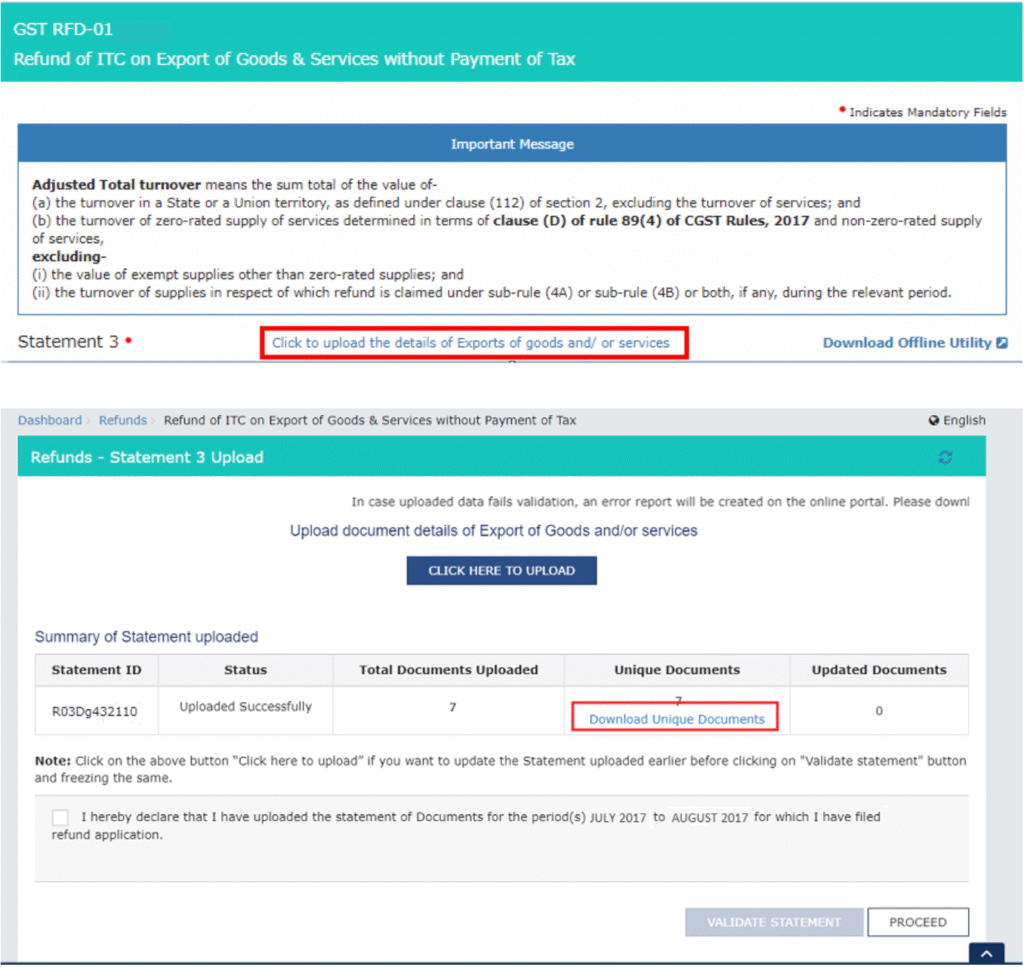
Download Statement 3 from the GST Portal and fill in the details of the export invoices for which you are claiming the refund. After entering the required information, upload the statement while submitting the refund application.

Step b:
After filling in the details, generate the JSON file of Statement 3 and upload it on the GST Portal. Once uploaded, the system will validate the file and show any errors, which should be corrected before proceeding with the refund application.
Step c:
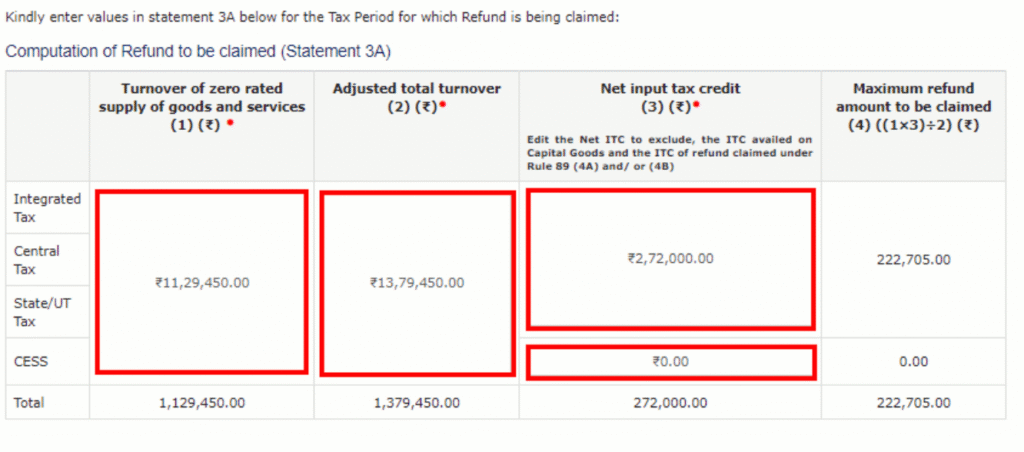
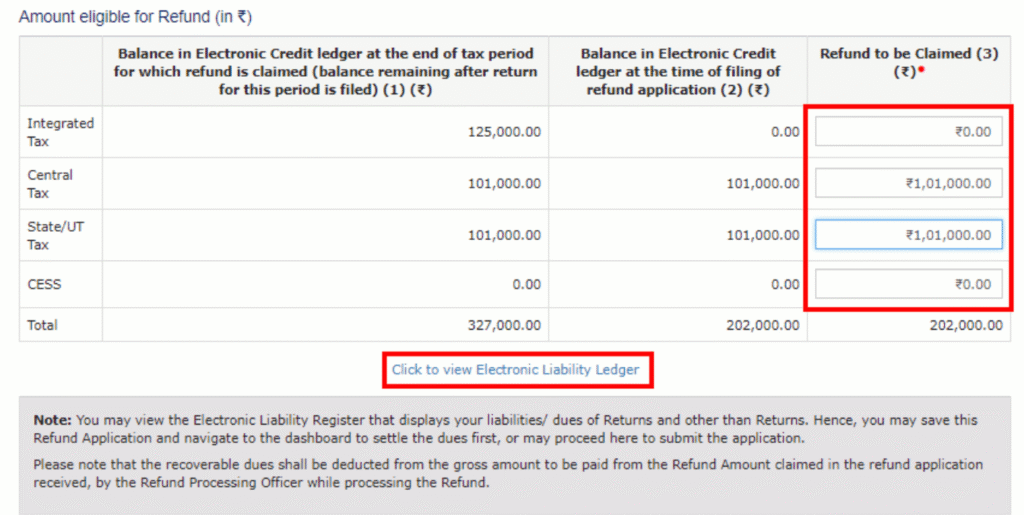
In the section “Computation of Refund to be Claimed – Statement 3A [Rule 89(4)]”, enter the required details such as aggregate turnover, adjusted total turnover, and net Input Tax Credit (ITC) while filing the refund application on the GST Portal under the Goods and Services Tax system.
Step d:
The system will then validate the information provided and automatically calculate the maximum refund amount that the taxpayer is eligible to claim under the Goods and Services Tax system on the GST Portal.
Type 4: Accumulated ITC Due to Supplies Made to SEZ Unit/SEZ Developer (Without Payment of Tax)
To claim this refund under the Goods and Services Tax system, the taxpayer must first ensure that the returns GSTR-1 and GSTR-3B for the selected period have been filed.
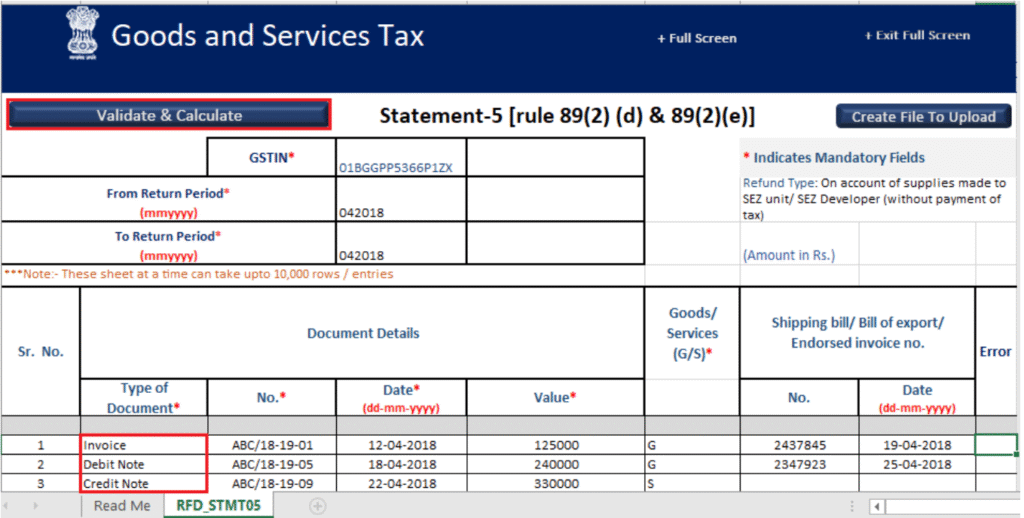
The steps for claiming this refund are similar to the process used for Type 3 refunds (accumulated ITC due to exports without payment of tax). However, instead of Statement 3, the taxpayer must download and use Statement 5.
In this case, the details of the invoices related to supplies made to the SEZ unit or SEZ developer must be entered, and the file can be uploaded in CSV format on the GST Portal instead of a JSON file.
Type 5: ITC Accumulated Due to Inverted Tax Structure
An inverted tax structure occurs when the tax rate on inputs is higher than the tax rate on output supplies under the Goods and Services Tax system. In such cases, taxpayers may accumulate Input Tax Credit (ITC) and can claim a refund for the excess credit.
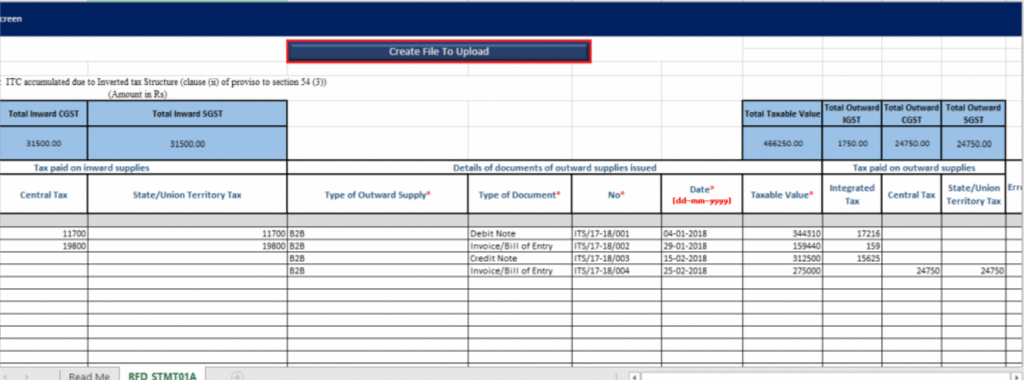
The refund process is similar to the steps followed for the Type 3 refund (accumulated ITC due to exports without payment of tax). However, in this case, the taxpayer must download and use Statement 1A while filing the refund application on the GST Portal.
After that, the taxpayer must enter details such as:
- Turnover of inverted rated supply
- Tax payable
- Adjusted total turnover
- Net Input Tax Credit (ITC)
Once these details are provided, the system will calculate the eligible refund amount based on the information entered.
Type 6: Refund by the Recipient of Deemed Exports
If a recipient of deemed exports has paid tax on inward supplies that qualify as deemed exports and has claimed Input Tax Credit (ITC) in their electronic credit ledger, they can apply for a refund of that tax under the Goods and Services Tax system. In this situation, the supplier of the deemed exports cannot claim the refund.
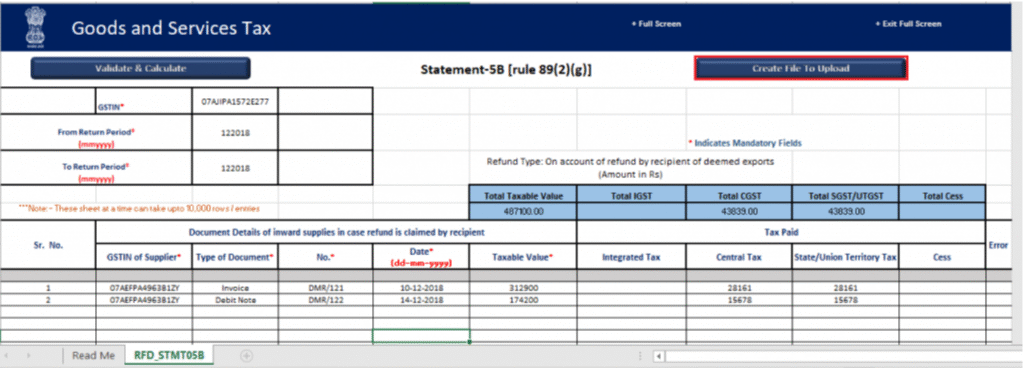
The process for claiming this refund is similar to the steps followed for the Type 3 refund. However, the taxpayer must use Statement 5B while filing the refund application on the GST Portal.
After downloading the statement, the taxpayer must enter details such as:
- Net Input Tax Credit (ITC) related to deemed exports
- Amount of refund to be claimed
Once the details are submitted, the system will process the refund based on the information provided.
Type 7: Tax Paid on Supplies Made to SEZ Unit/SEZ Developer (With Payment of Tax)
If a supplier has paid tax on supplies made to an SEZ unit or SEZ developer, they can claim a refund under the Goods and Services Tax system.
The refund process is similar to the steps followed for the Type 3 refund (accumulated ITC due to exports without payment of tax). However, in this case the taxpayer must download and use Statement 4 while filing the refund application on the GST Portal.
After uploading Statement 4, the refund amount will be automatically calculated and filled in the application based on the information provided in the statement.
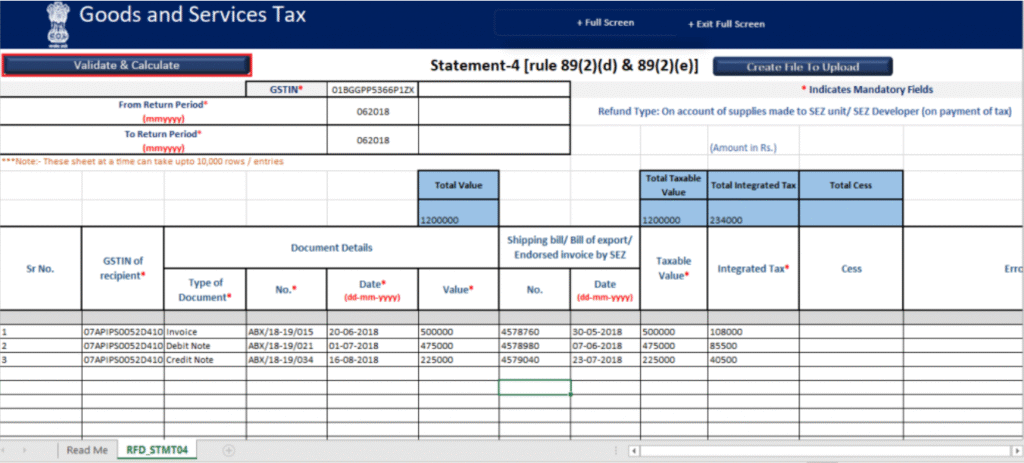
Type 8: Tax Paid on an Intrastate Supply Later Treated as Interstate Supply (and Vice Versa)
Sometimes a supply may be incorrectly treated as intrastate instead of interstate, or vice versa while paying tax under the Goods and Services Tax system. In such cases, taxpayers can claim a refund for the tax paid incorrectly.
The refund process is similar to the steps followed for the Type 3 refund. However, the taxpayer must download and use Statement 6 while filing the refund application on the GST Portal.
After uploading Statement 6, the refund amount will be automatically calculated and filled in the application based on the details provided in the statement.
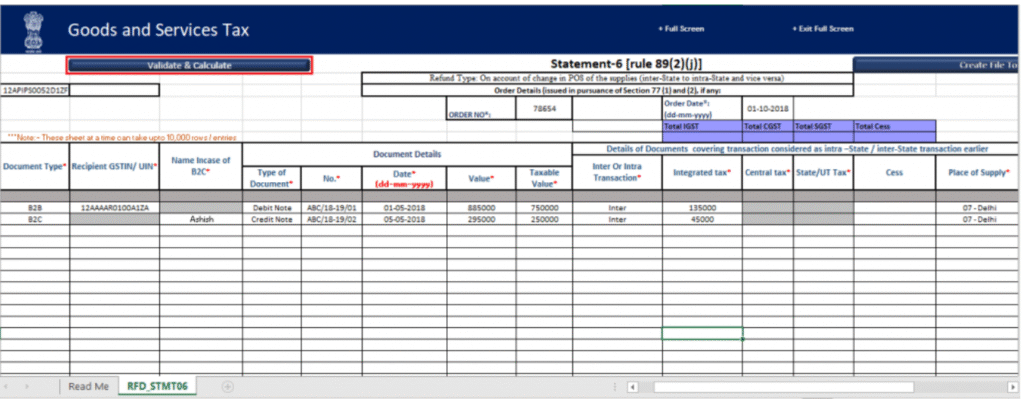
Type 9: Refund by the Supplier of Deemed Exports
A supplier of deemed exports can claim a refund of the tax paid under the Goods and Services Tax system, provided the recipient has not claimed the refund for the same transaction.
The refund process is similar to the steps followed for the Type 3 refund. However, the taxpayer must download and use Statement 5B while filing the refund application on the GST Portal.
After uploading Statement 5B, the refund amount will be automatically calculated and filled in the application based on the information provided in the statement.
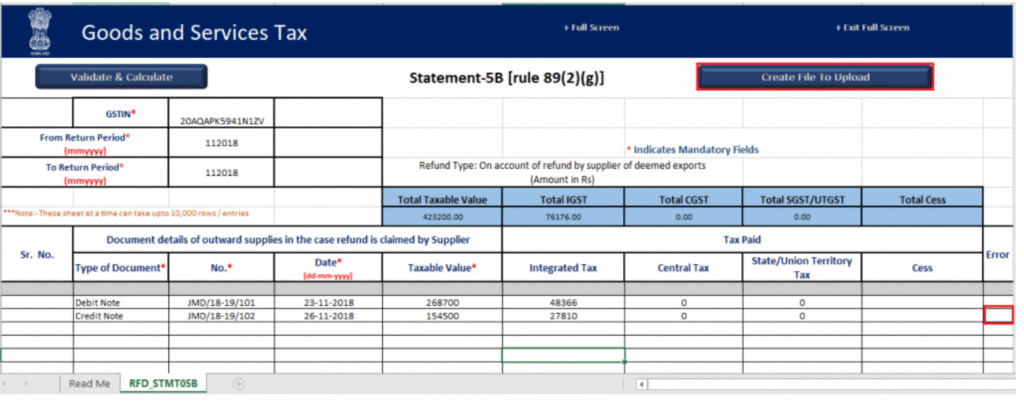
Type 10: Refund of IGST Paid on Export of Services (With Tax Payment)
If a taxpayer has paid IGST on the export of services, they can claim a refund under the Goods and Services Tax system.
The process for claiming this refund is similar to the steps followed for the Type 3 refund. However, the taxpayer must download and use Statement 2 while filing the refund application on the GST Portal.
After uploading Statement 2, the refund amount will be automatically calculated and filled in the refund application based on the details provided in the statement.
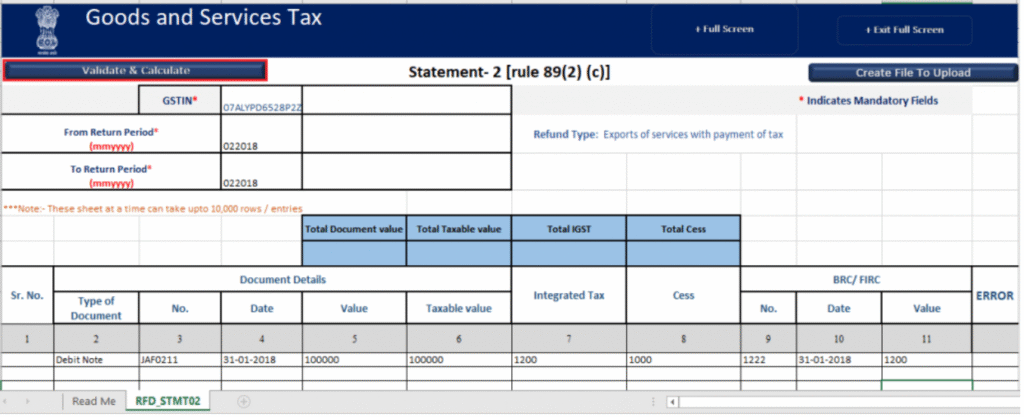
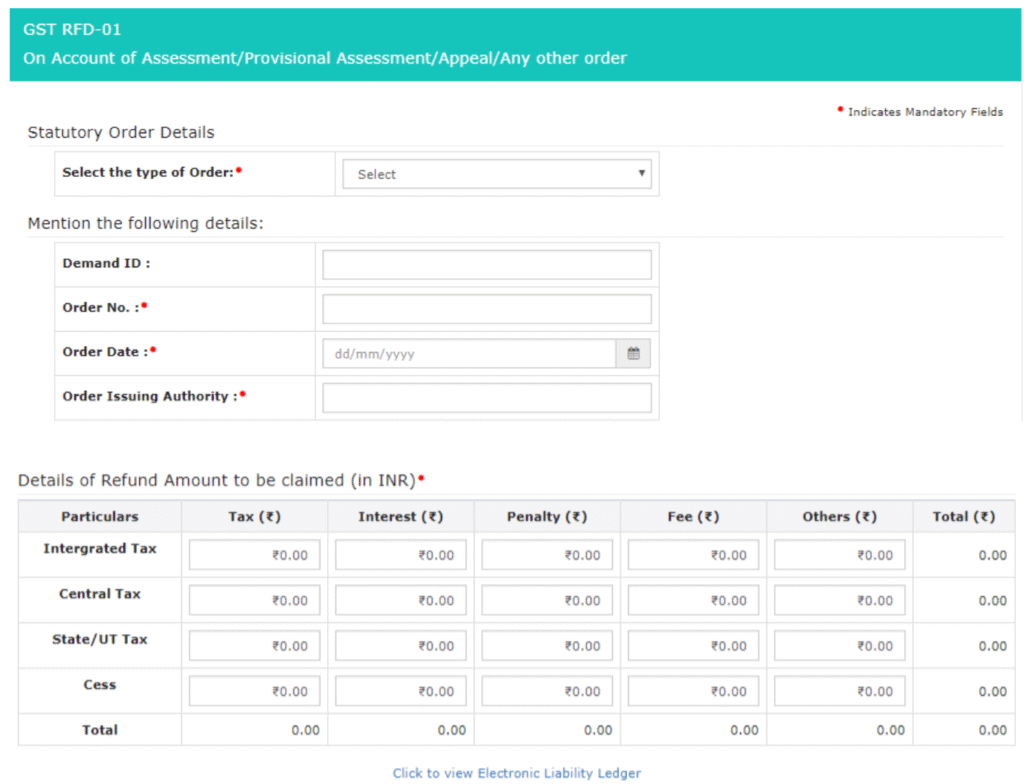
Type 11: Refund Due to Assessment, Provisional Assessment, Appeal, or Other Orders
In some cases, a refund may arise due to an assessment order, provisional assessment, appeal decision, or any other official order issued under the Goods and Services Tax system.
In this situation, the taxpayer must select the type of order while filing the refund application on the GST Portal. After that, the required details of the order such as order number, date, and the authority issuing the order must be entered before proceeding with the refund claim.
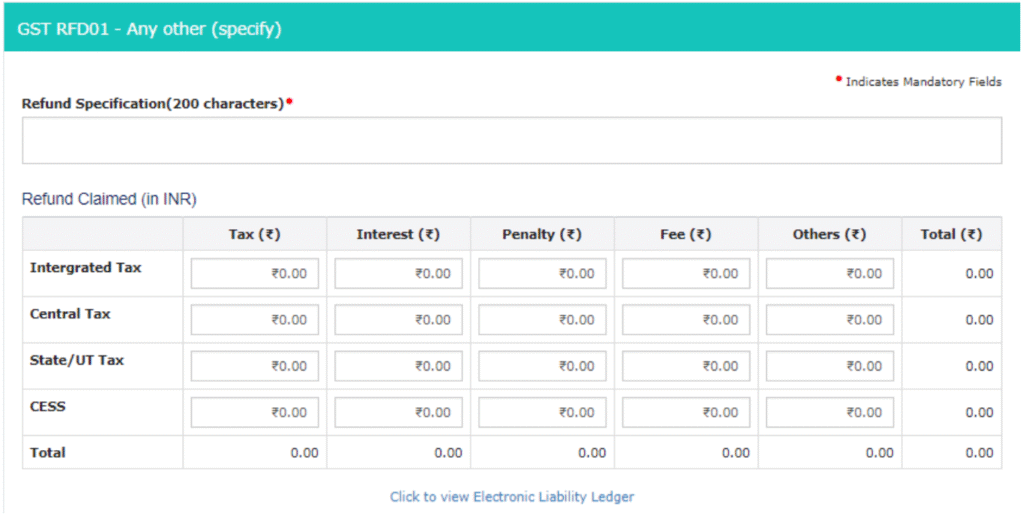
Type 12: Refund on “Any Other Ground”
Taxpayers can also apply for a refund under “Any Other Ground” if the refund does not fall under the usual categories in the Goods and Services Tax system. For example, this may include excess interest paid while filing GSTR-3B.
Step 5:
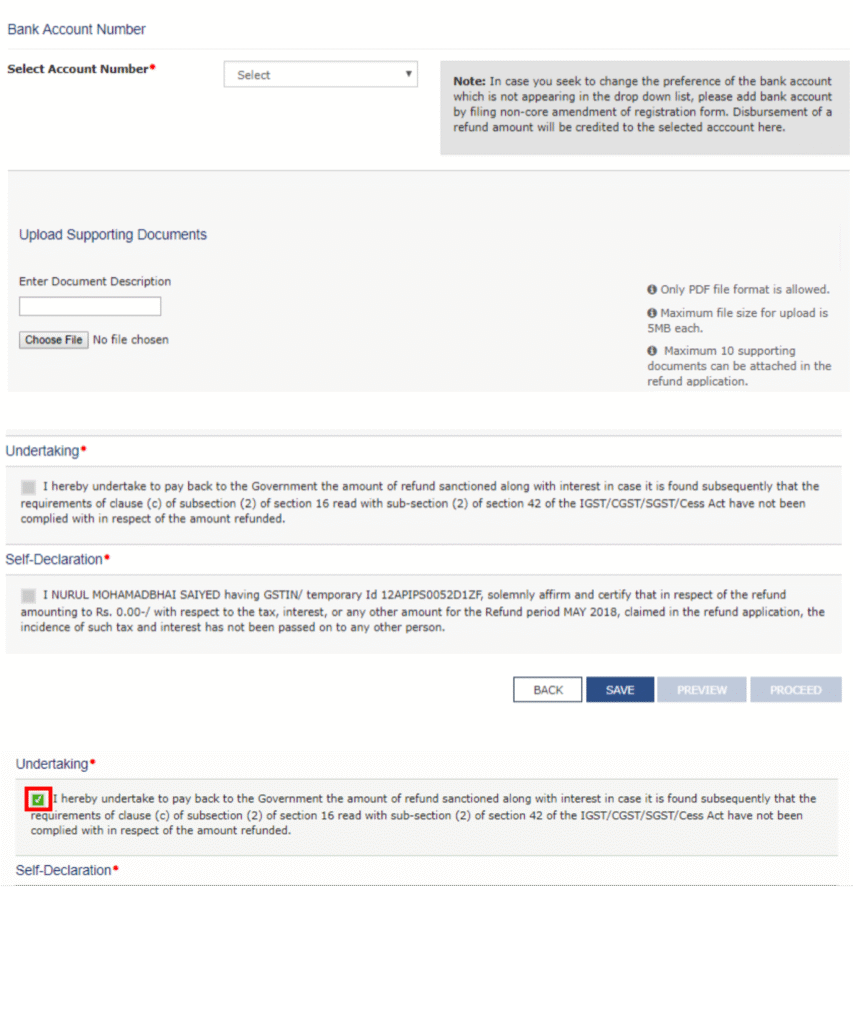
Enter the bank account details where you want the refund to be credited on the GST Portal. After that, upload the required supporting documents and declarations, if they are required for the selected refund type under the Goods and Services Tax system.
You can upload up to 10 supporting documents, and each file must be within 5 MB in size.
Next, preview the refund application and click “Save.” The saved application will remain available for 15 days so the taxpayer can review or edit it.
Finally, check the boxes for undertaking and self-declaration, and then click “Proceed” to move forward with the refund application.
Step 6:
Finally, submit Form RFD-01 on the GST Portal by verifying the application using EVC (Electronic Verification Code) or DSC (Digital Signature Certificate) under the Goods and Services Tax system.
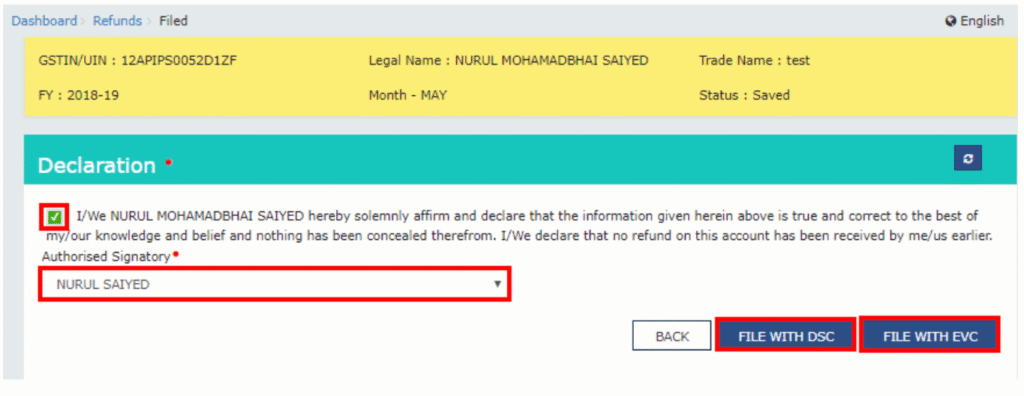
After successfully filing Form RFD-01, an Application Reference Number (ARN) is generated and displayed on the screen. Taxpayers can use this ARN to track the status of their refund. The ARN is also sent to the taxpayer’s registered email address and mobile number for reference.
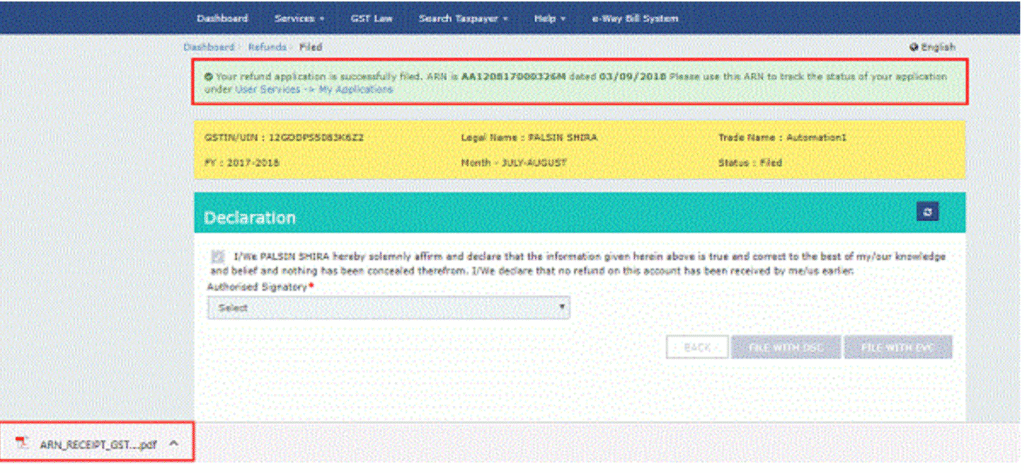
After submission, the refund application is assigned to the refund processing officer. The officer reviews and processes the application, and the refund status is updated on the GST Portal, allowing the taxpayer to track progress until the refund is credited.
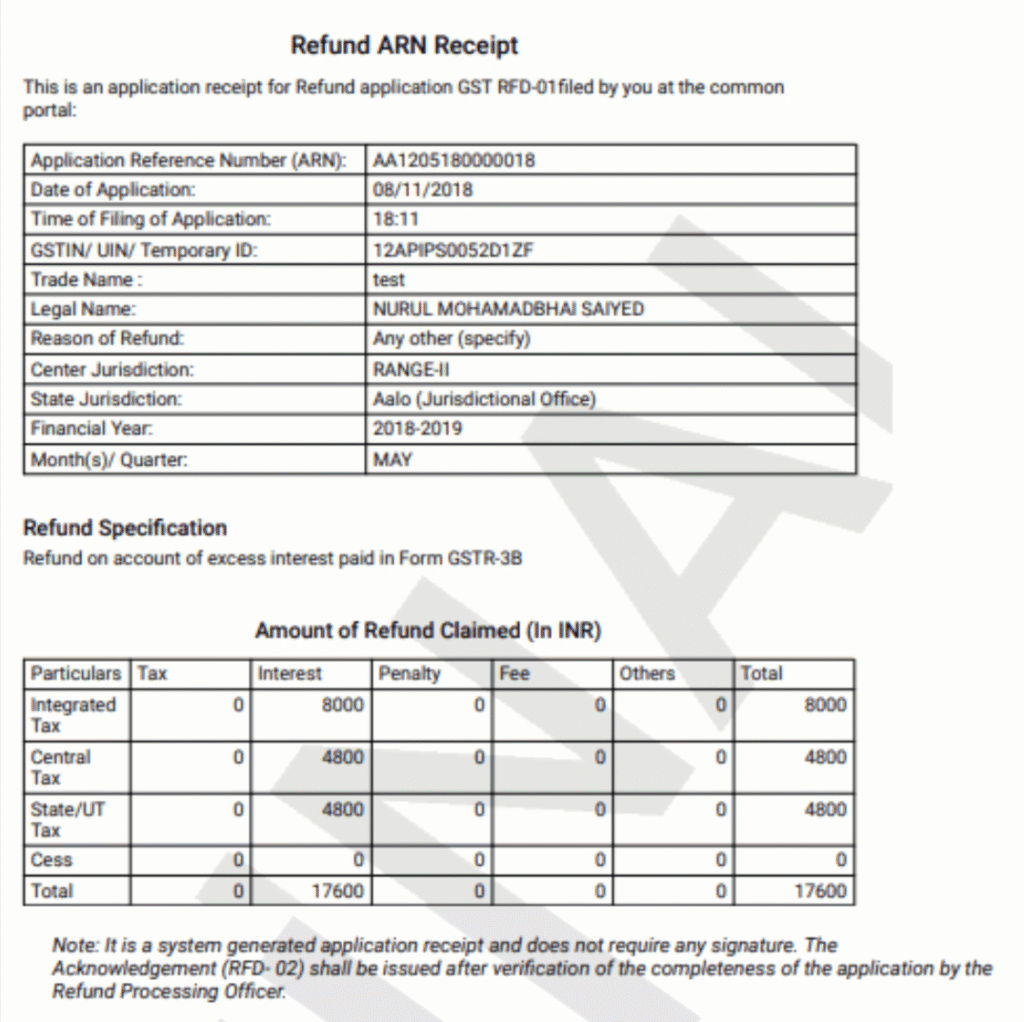
Refund Claim by an Unregistered Person
An unregistered person who is eligible for a GST refund must first obtain GST registration. After registration, they can apply for a refund using Form RFD-01, providing Statement 8, a supplier certificate, and any other supporting documents required for the claim.
GST Refund Process for Embassies and International Organisations
Embassies and international organisations can claim GST refunds in two ways under the Goods and Services Tax system:
- Through GSTR-11 – Generate a refund application in Form RFD-10.
- Directly from the Dashboard – Download and use Form RFD-10 after logging into the GST Portal.
Step 1 (Using GSTR-11):
Go to the GSTR-11 return that has already been filed for the relevant tax period/quarter. Then click on the “Generate RFD-10” button to create the refund application.
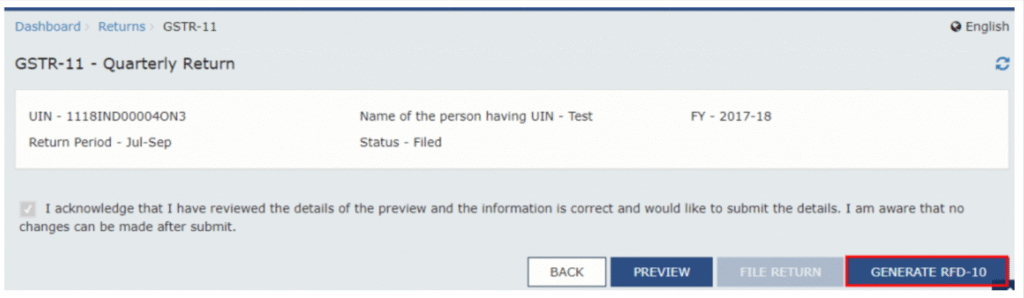
Next, select the radio button for the embassy or international organisation and click “Create.”
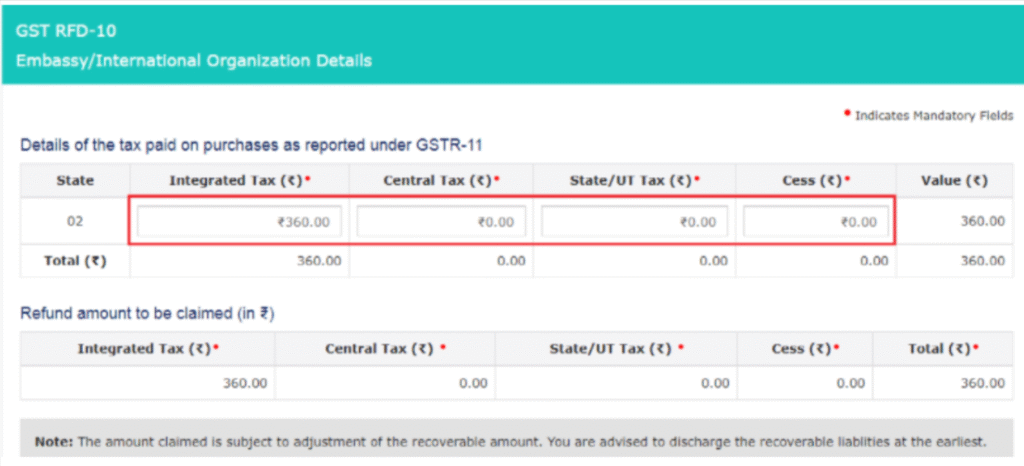
The table titled “Details of the Tax Paid on Purchases as Reported Under GSTR-11” will appear. The amounts will be auto-populated from the filed GSTR-11 return for the selected period, but they can also be edited manually if needed before submitting the refund application.

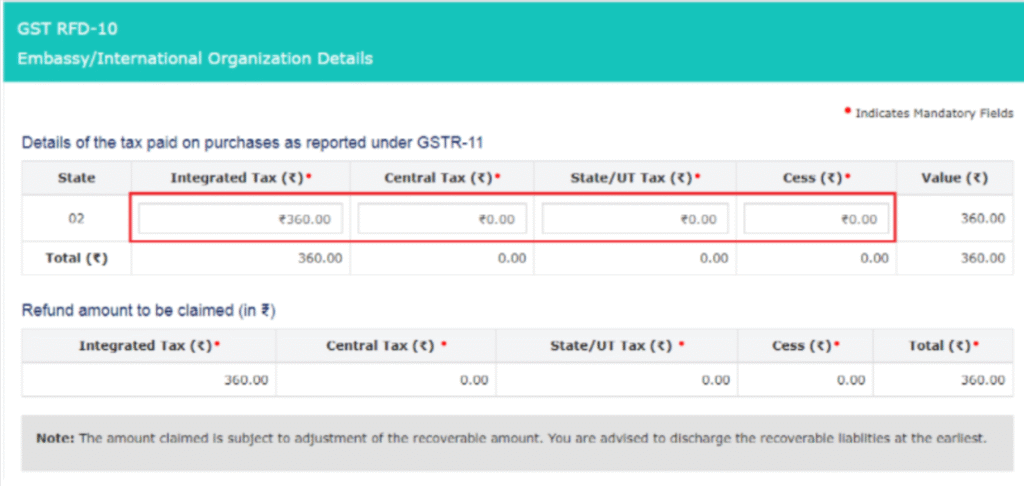
Preview and submit using DSC or EVC.
In the second method, log in to the GST portal and go to the “Services” tab. Select “Refunds”, and then click on the “Application for Refund” option on the dashboard to start filing Form RFD-10 for the embassy or international organisation.

On the next page, select “Embassy/International Organisation” as the type of taxpayer and then click “Create” to start the refund application process.

The tax paid eligible for refund will be auto-populated from the filed GSTR-11.
Carefully verify the details and, if needed, edit or enter the correct refund amount before proceeding with the application.
What Happens After You Apply for a GST Refund?
Once you submit a GST refund application, it goes to the refund officer for review. They check your application and supporting documents. You can track the status on the GST portal. After approval, the refund is credited to your bank account.
Here’s a simple breakdown of what the officer can do:
- Provisional Refund (RFD-04): Sometimes, the officer gives 90% of the refund quickly, within 7 days.
- Acknowledgement (RFD-02): Confirms your application is received, usually within 15 days.
- Withdraw Application (RFD-01W): You can cancel your refund request, and any debited amount is recredited.
- Deficiency Memo (RFD-03): If there are errors, the officer asks you to correct and resubmit.
- Notice for Clarification (RFD-08 & RFD-09): If the refund might be rejected or wrongly granted, the officer asks for clarification. You must reply within 15 days.
- Sanction or Rejection (RFD-06): Officer approves or rejects your refund.
- Payment Order (RFD-05): The official order to release the refund.
- Withholding Refund (RFD-07 Part-B): Refund may be temporarily held, no payment order issued.
- Re-credit (PMT-03): If refund is rejected or provisional refund was given, the amount goes back to your GST ledger.
In short, the officer checks, approves, or asks for corrections, and then your refund is credited safely.
Frequently Asked Questions (FAQs) on GST Refund
1. What are the different types of GST refunds available?
GST refunds can include:
- Excess cash balance in the electronic ledger
- Excess tax paid through GSTR-3B
- Accumulated ITC due to exports or SEZ supplies (with or without tax payment)
- Refund due to inverted duty structure
- Refund on deemed exports
- Refund due to assessments, appeals, or other official orders
- Any other valid ground for refund
2. Who can claim a refund in GST?
Eligible taxpayers, exporters, SEZ units/developers, recipients or suppliers of deemed exports, and even unregistered persons (after registration) can claim a refund under GST.
3. How do I track the status of my GST refund application?
You can track your refund using the “Track Application Status” option on the GST portal using your Application Reference Number (ARN).
4. What are the common reasons for GST refund rejection?
Refunds may be rejected due to:
- Incomplete or incorrect application
- Errors in invoices or GSTR returns
- Missing supporting documents
- Mismatched details in the GST portal
5. Can a GST refund claim be revised after submission?
Yes, in some cases you can withdraw the application (RFD-01W) and resubmit after making corrections.
6. Where can I seek help if my GST refund claim is denied?
You can approach the jurisdictional GST officer or file an appeal with the appellate authority under GST law.